Senior UX/UI Designer
AHEAD
Designing an AI-Ready UX Workflow: From Figma to Agentic Implementation
As organizations increasingly adopt AI-assisted development, maintaining design consistency, usability, and human oversight becomes a new challenge. At AHEAD, I helped establish a workflow that connected Figma design systems, AI coding tools, and structured UX guidelines to support more consistent interface development.
As a UX/UI Lead, I focused on making design standards understandable to AI agents, evaluating AI-generated interfaces against approved patterns, and establishing human review practices that kept usability and design intent central to implementation. The work combined traditional UX leadership with emerging capabilities in agentic UX design, AI-assisted prototyping, Model Context Protocol (MCP) integrations, and design system governance.
The Challenge
AI-assisted development tools can accelerate interface creation, but they don't inherently understand an organization's design system, interaction conventions, or UX standards.
Even when AI agents have access to Figma components and existing code, they may interpret incomplete specifications differently, introduce inconsistent patterns, or make design decisions without sufficient context.
At AHEAD, the challenge was to establish a more structured relationship between design and AI-assisted development. We needed to make design knowledge accessible to AI tools, identify inconsistencies in generated interfaces, and maintain human oversight when implementation decisions required UX judgment.
The goal wasn't simply to generate interfaces faster. It was to establish a repeatable workflow in which AI could assist with implementation while designers retained responsibility for usability, consistency, and design quality.
The Solution: Connecting Design, AI, and Human Review
I helped establish a design-to-code workflow connecting Figma source designs, documented design standards, coded components, AI-assisted implementation, and UX validation.
Using MCP connections between Figma and tools including Claude and Cursor, I explored how AI-assisted workflows could reference design components and specifications. Supporting Markdown documentation provided additional guidance for component usage, naming conventions, interaction patterns, and design constraints.
The workflow incorporated six stages: Figma source designs, design system rules, coded components, AI implementation, visual validation, and human UX review.
Rather than treating implementation as the final step, the process introduced a feedback loop. Findings from UX reviews informed targeted recommendations for improving component definitions, documentation, and shared design rules.
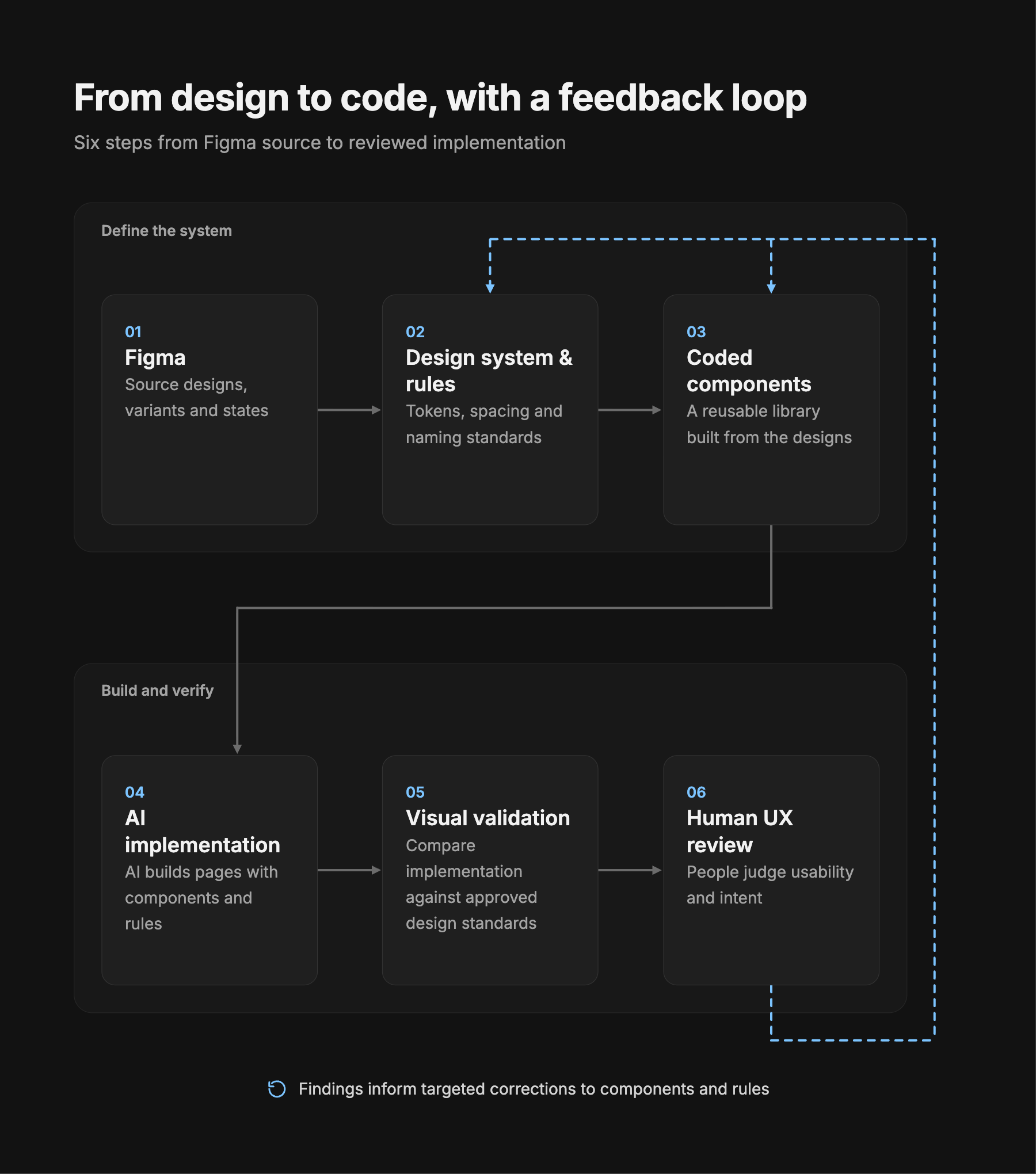
This approach connected AI-assisted development with established UX practices, creating opportunities to improve implementation consistency while preserving human judgment.
CHALLENGE #1
Making Design Systems Understandable to AI Agents
One of the primary challenges was translating design knowledge into instructions AI agents could interpret and apply.
Traditional design systems often depend on visual examples, component libraries, and conventions understood by designers and developers. AI agents require more explicit guidance to understand when to use a component, which variants are permitted, and how to handle situations that fall outside established patterns.
I helped translate design intent into structured component specifications and Markdown guidance covering design tokens, spacing, naming conventions, component states, and interaction behaviors.
For example, a status badge specification could define approved variants, semantic meaning, label conventions, and icon usage. The corresponding coded component established the implementation structure, while Markdown rules explained how an AI agent should use it.
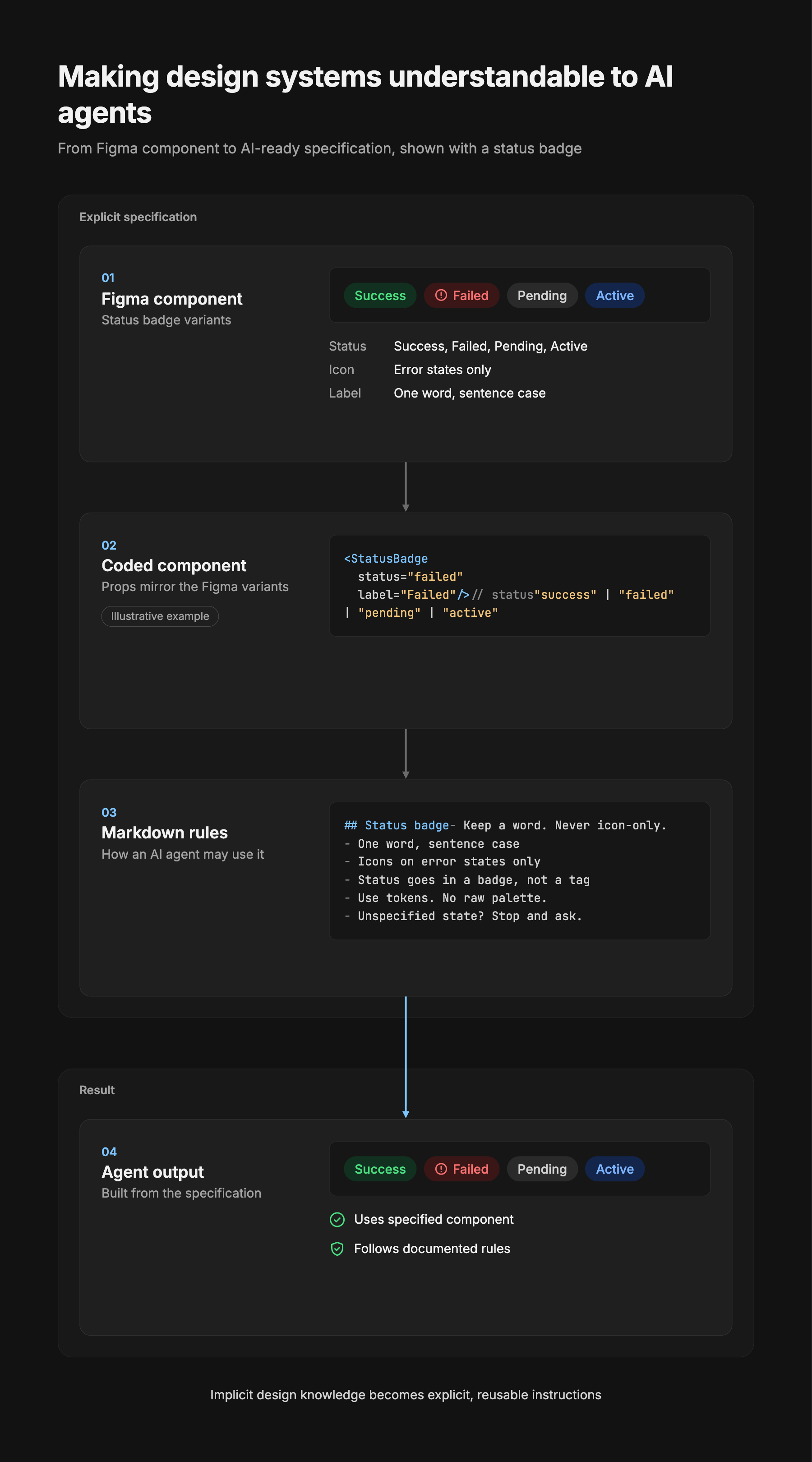
This approach made implicit design knowledge more explicit and reusable. It provided clearer guidance for AI-assisted implementation and helped reduce reliance on individual interpretation when applying established design patterns.
It also reinforced an important principle: AI agents should work within documented design constraints rather than inventing new components, styles, or behaviors when specifications are incomplete.
CHALLENGE #2
Identifying and Correcting AI-Generated Design Drift
Another challenge was evaluating whether AI-generated interfaces accurately reflected approved design patterns.
Using Cursor, I developed a comparison workflow to review implemented interfaces alongside their Figma references. These evaluations examined component usage, typography, spacing, visual hierarchy, interaction behavior, and consistency with established UX conventions.
The process helped surface discrepancies that could otherwise become embedded in the implementation.
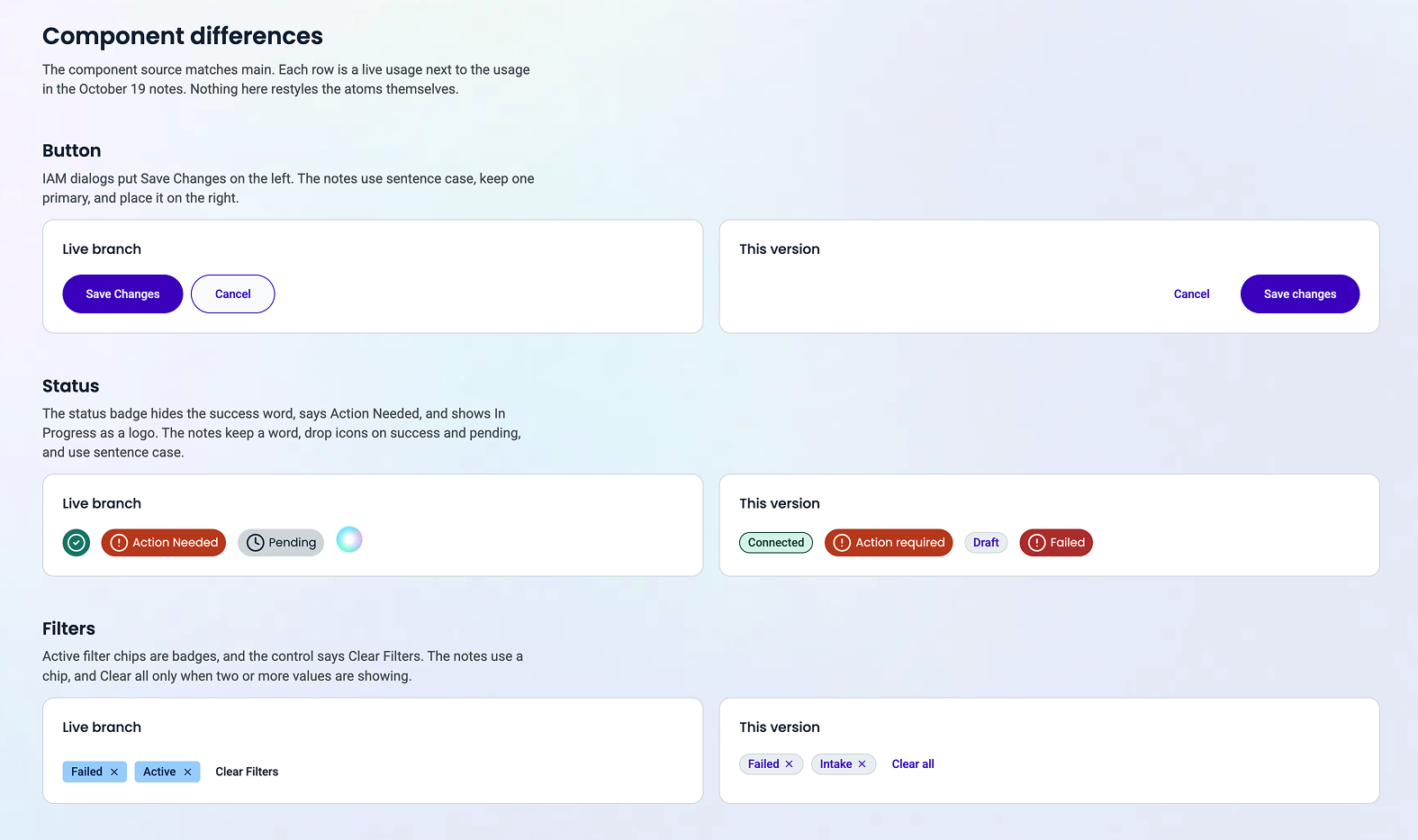
For example, an audit identified differences in dialog action placement and button capitalization. The implementation placed the primary action on the left and used title case, while the approved pattern placed the primary action on the right and used sentence case.
Rather than treating the issue as an isolated visual defect, I investigated potential causes in component guidance and shared formatting behavior.
I documented findings as actionable JIRA recommendations, identifying the observed discrepancy, expected behavior, and suggested correction. Where appropriate, recommendations addressed shared component specifications or design rules rather than individual screens.
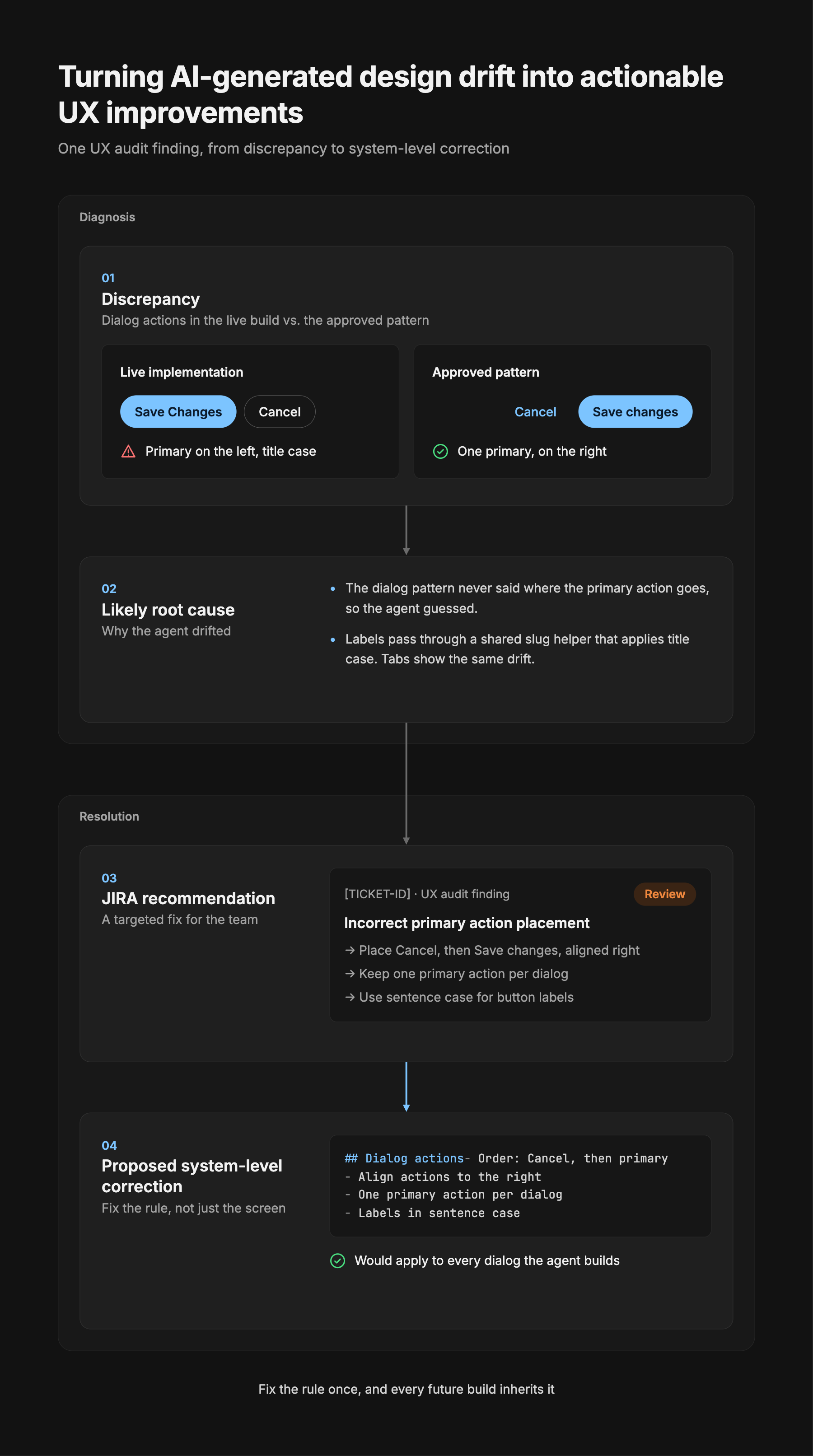
This approach connected UX auditing with design system governance. Instead of repeatedly correcting similar issues at the screen level, the process identified opportunities to improve the underlying guidance used during implementation.
The result was a more structured method for evaluating AI-generated interfaces and translating UX findings into actionable recommendations for development teams.
CHALLENGE #3
Establishing Human Oversight for AI-Generated Interfaces
AI agents can follow documented instructions, but they also encounter situations where design requirements are incomplete, ambiguous, or contradictory.
Allowing an agent to independently resolve every uncertainty introduces the risk of inconsistent design decisions and unintended interaction behaviors.
I helped establish guidance defining how AI agents should respond when they encounter missing specifications or conflicting rules.
Rather than inventing a component variant, design token, or interaction pattern, the guidance directed agents to stop, identify the ambiguity, and request clarification.
A human reviewer could then evaluate the issue, approve an existing pattern, clarify the specification, or recommend updating the documented rules.
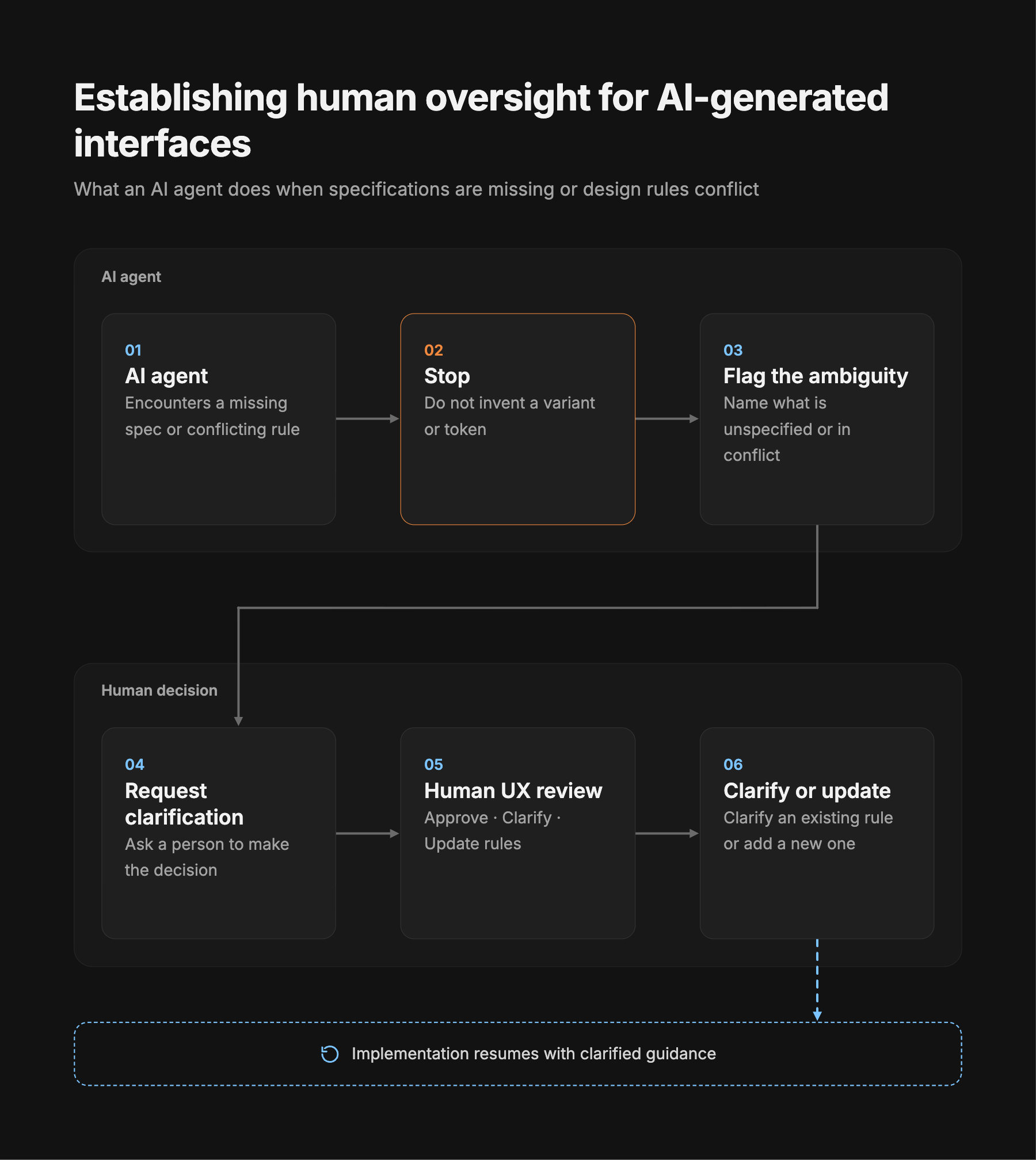
This approach positioned human judgment as an essential part of AI-assisted development.
Designers remained responsible for evaluating usability, accessibility, interaction intent, and consistency with the broader experience. AI agents could support implementation, but unresolved UX decisions required human direction.
The resulting guidance provided a clearer framework for handling uncertainty and reinforced accountability for design quality.
CHALLENGE #4
AI-Assisted Prototyping and Workflow Integration
Beyond design system documentation and auditing, I explored how AI-assisted tools could support more interactive and implementation-oriented UX workflows.
Using Cursor, Claude, and Figma Make, I worked with functional prototypes and interface implementations to evaluate design patterns beyond static mockups.
MCP integrations between Figma and Claude or Cursor helped connect design context with AI-assisted workflows. These connections supported exploration of how components, variants, and design specifications could inform implementation.
Working prototypes also provided opportunities to evaluate interaction behavior, component states, and implementation decisions in a more realistic context.
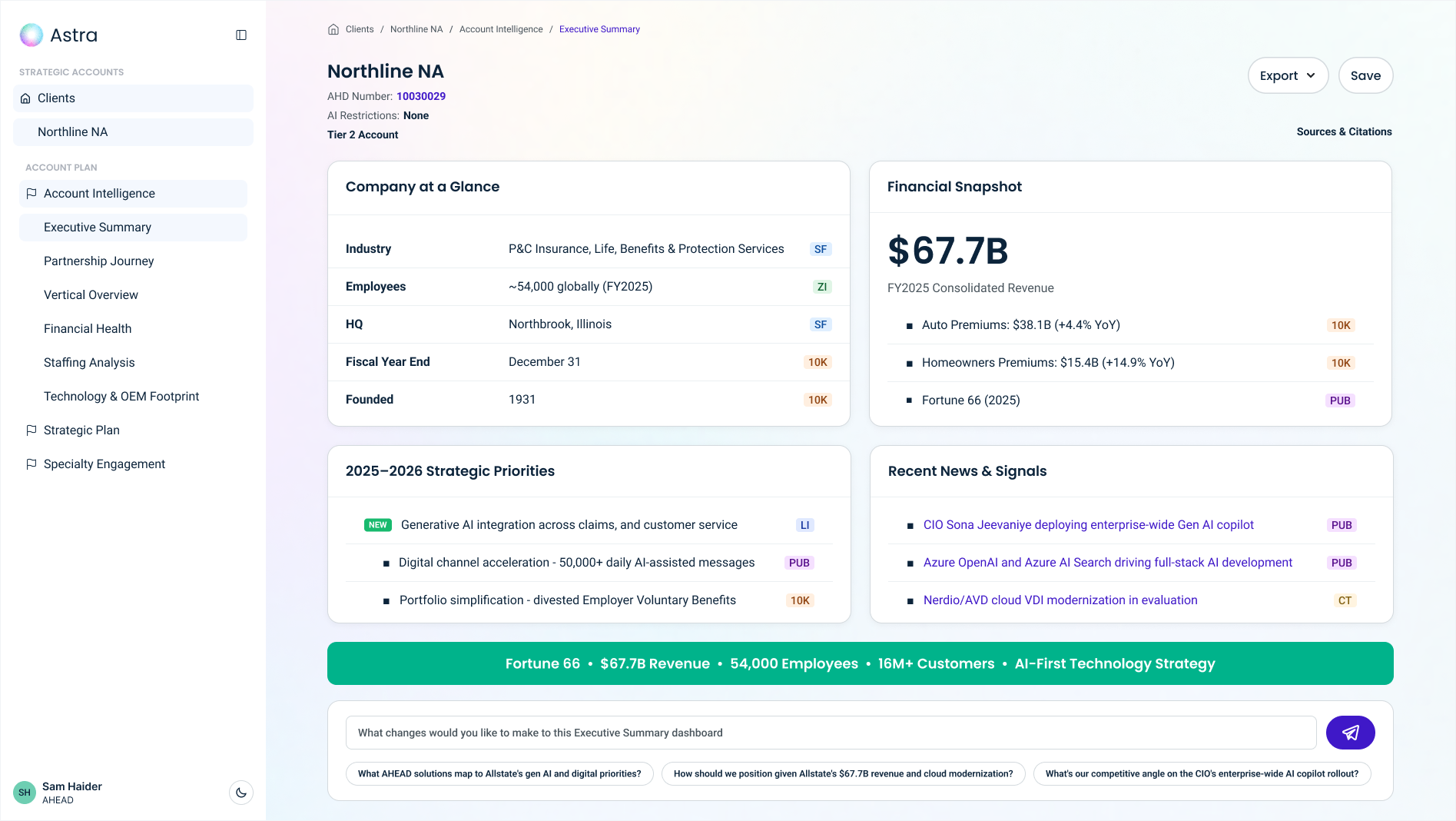
This expanded the role of UX beyond producing design deliverables. It created opportunities to evaluate how design decisions translated into working interfaces and to provide more actionable feedback during development.
Impact and Outcomes
The engagement helped establish a more structured approach to incorporating AI-assisted development into UX and design system workflows.
Clearer design guidance: Translated design conventions into more explicit component specifications and reusable Markdown rules that AI tools could reference.
More actionable UX evaluation: Developed a comparison approach for identifying implementation discrepancies and documenting targeted recommendations.
Stronger design system governance: Connected individual UX findings with opportunities to improve shared components and implementation standards.
Defined human review boundaries: Established guidance for escalating ambiguous design decisions rather than allowing AI agents to invent unsupported patterns.
Closer alignment between design and implementation: Used AI-assisted prototypes, coded interfaces, and visual comparisons to evaluate how design intent translated into working experiences.
These outcomes provided a foundation for more consistent AI-assisted interface development while maintaining the importance of human UX expertise.
Key Takeaways
This engagement reinforced that effective AI-assisted development requires more than access to design files or capable coding agents.
Design systems must communicate not only what components look like, but how they should behave, when they should be used, and what constraints govern their implementation.
It also demonstrated the value of connecting UX evaluation to the underlying design system. When implementation discrepancies reveal incomplete or ambiguous guidance, addressing the shared standard can help prevent similar issues in future work.
Most importantly, AI-assisted development changes the role of UX designers rather than eliminating the need for them. Designers increasingly define the rules, constraints, review processes, and human decision points that guide AI-generated experiences.
By connecting design systems, AI tools, and human oversight, I helped establish a workflow that supports AI-assisted implementation without compromising the importance of usability, consistency, and intentional design.